Best Starter DCC Controllers Reviewed: Top Picks for New Model Railroaders
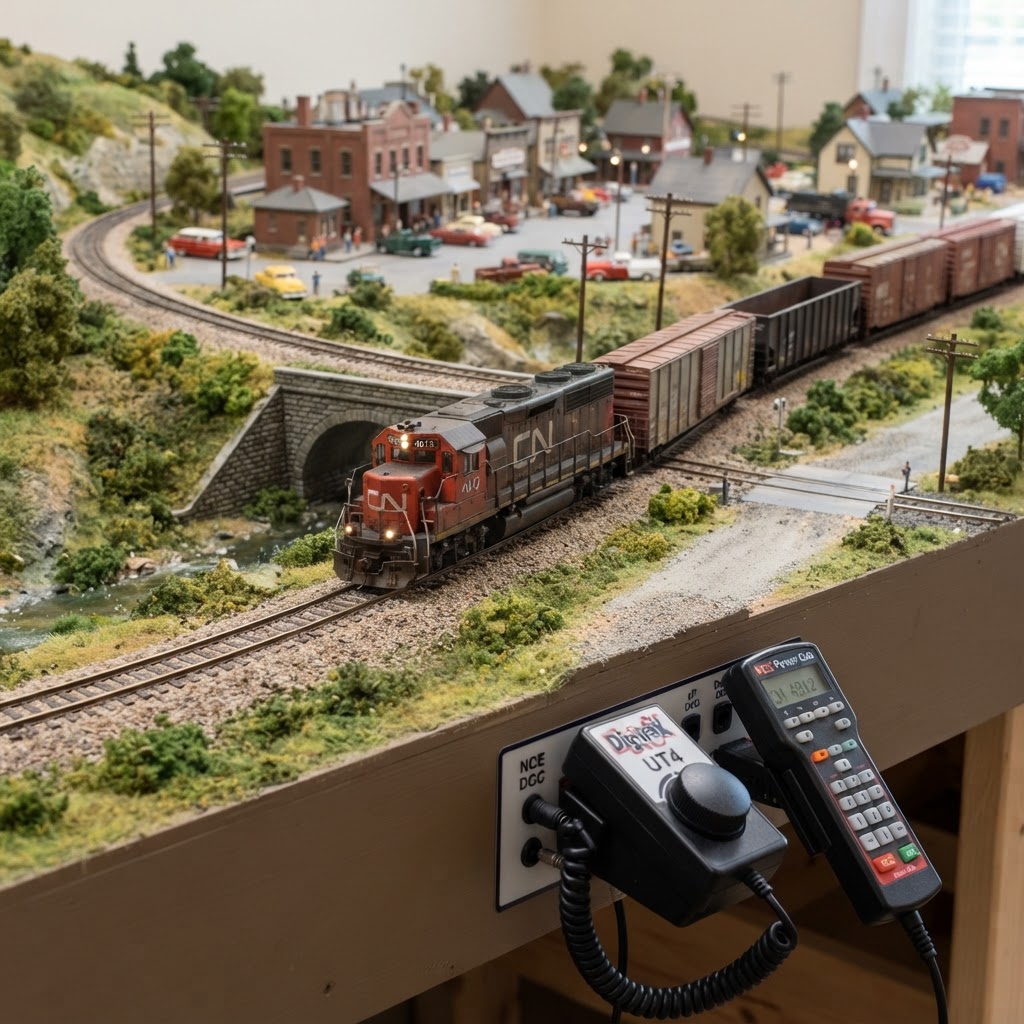
If you've recently discovered the joy of model railroading, you've probably heard the term "DCC" thrown around quite a bit. Digital Command Control (DCC) is the modern standard for operating model trains, giving you individual control over each locomotive on your layout — adjusting speed, direction, lighting, and sound all from a single handheld device. Choosing among the best starter DCC controllers can feel overwhelming when you're just getting started, but the right system will transform your hobby experience from day one. This guide is designed to cut through the confusion and help you make a confident first purchase.
Unlike traditional DC (analog) control, DCC allows multiple trains to run simultaneously on the same track, each responding only to its own commands. For beginners, this opens up a world of creative possibilities without requiring you to rewire your entire layout. Whether you're building a compact HO scale shelf layout or exploring the world of N scale, having a reliable and easy-to-use DCC system is the foundation everything else is built upon. If you're still deciding on a scale, check out our guide on Choosing a Model Train Scale: The Ultimate Guide for Beginners before committing to a controller.
In this article, we'll review the top starter DCC controllers on the market, break down the key features to look for, and help you understand what separates a beginner-friendly system from one better suited to advanced modelers. We'll also answer the most common questions beginners ask before making their first DCC purchase. Let's get started.
What Is a DCC Controller and Why Does It Matter?
A DCC controller — sometimes called a command station or throttle — is the brain of your digital layout. It sends digital signals through the rails to individual decoders installed in each locomotive. Each decoder has a unique address, so your controller can communicate with one specific engine at a time, even if a dozen trains are running on the same track.
For beginners, the controller is arguably the most important piece of equipment to get right. A poorly designed system can be frustrating and difficult to expand later, while a well-chosen beginner system can grow with you as your layout evolves. Before choosing a controller, you'll also want to think about whether your locomotives already have DCC decoders installed — if not, our Best DCC Decoders for Locomotive Upgrades guide will walk you through that process.
Key Terms to Know Before You Buy
- Command Station: The central unit that generates and sends DCC signals to the track.
- Throttle/Cab: The handheld device you use to control trains. Some systems combine command station and throttle into one unit.
- Decoder: The chip inside each locomotive that receives DCC signals and controls the motor and lights.
- Amp Rating: How much electrical current the system can supply. Beginner systems typically range from 1.5A to 5A.
- CV Programming: Configuration Variables allow you to customize decoder behavior. Beginner systems should make this accessible.
What to Look for in a Beginner DCC System
Before diving into specific product recommendations, it's worth understanding what makes a DCC system beginner-friendly. Not all controllers are created equal, and some features matter much more at the entry level than they will once you've gained experience.
Ease of Use
The most important factor for any beginner is simplicity. Look for a system with an intuitive interface — clear buttons, a readable display, and logical menus. Some systems use smartphone apps as throttles, which can actually make the learning curve gentler if you're comfortable with touchscreens.
Power Output
For small to medium layouts with a handful of locomotives, a system rated at 1.5A to 3A is typically sufficient. If you plan to expand or run multiple sound-equipped locomotives (which draw more current), look for something in the 3A to 5A range from the start.
Expandability
A good starter system should be able to grow with you. Look for systems that support additional throttles, computer interface options, and compatibility with popular accessory decoders for turnouts and signals.
Cost
Entry-level DCC systems range from around $50 to $200. Spending a bit more upfront on a quality system often saves money in the long run, since you won't need to replace it as your layout grows. Check out our recommended products page for current pricing and availability.
Best Starter DCC Controllers Reviewed
Here are our top picks for beginners entering the world of digital command control. Each system has been evaluated for ease of use, value, expandability, and community support.
1. Bachmann E-Z Command DCC System
Best for: Absolute beginners on a tight budget
The Bachmann E-Z Command is one of the most affordable entry points into DCC, and it's often bundled with Bachmann train sets. It features a simple dial-and-button interface that can control up to 10 different locomotive addresses. There's no complex menu to navigate — you simply select an address and turn the dial to control speed.
The system is rated at 1A, which is adequate for smaller layouts with one or two locomotives running at a time. It doesn't offer a lot of advanced features, but for someone who just wants to run trains digitally without complexity, it's a solid first step.
Pros: Very affordable, easy to use, widely available
Cons: Limited expandability, low amperage, no computer interface
2. Digitrax Zephyr Xtra (DCS52)
Best for: Beginners who want room to grow
The Digitrax Zephyr Xtra is consistently one of the most recommended starter systems in the model railroad community, and for good reason. Rated at 2.5A, it handles small to medium layouts comfortably and supports up to 10 locomotive addresses from the base unit. It also allows you to plug in additional LocoNet-compatible throttles, making it highly expandable.
Programming is done via a dedicated programming track output, which protects your locomotives during CV adjustments. The Zephyr Xtra also supports computer control via Digitrax's PR3 interface, opening the door to layout automation software like JMRI.
Pros: Great expandability, strong community support, programming track output, 2.5A
Cons: Interface has a learning curve, slightly higher cost than budget options
3. NCE Power Cab
Best for: Beginners who want an all-in-one handheld system
The NCE Power Cab is a self-contained DCC system where the throttle, command station, and power supply are integrated into a single handheld unit. Rated at 1.75A, it's ideal for smaller layouts. What sets the Power Cab apart is its remarkably clean and logical interface — many beginners find it the easiest full-featured DCC system to learn.
NCE also has an excellent reputation for customer support, which is invaluable for beginners who hit snags. The Power Cab can be upgraded to a full NCE system later, so you're not locked into a dead end.
Pros: Intuitive interface, excellent support, upgradeable, clean design
Cons: 1.75A limit, requires upgrade for larger layouts
4. Hornby Elite DCC Controller
Best for: UK-based beginners or those who prefer a traditional cab design
The Hornby Elite offers a dual-throttle design, meaning two operators can control two different locomotives simultaneously from the same unit — a great feature for club settings or running sessions with a friend or family member. Rated at 4A, it offers more headroom than most beginner systems.
The interface is more traditional, with dual control knobs and a clear LCD display. It's compatible with NMRA DCC standards, so it works with decoders from any major manufacturer. If you've been comparing brands, our MTH vs Lionel DCC features comparison also touches on controller compatibility across major ecosystems.
Pros: Dual throttle, 4A output, solid build quality
Cons: Higher price point, less common in North America
5. MRC Prodigy Advance Squared
Best for: Beginners who want sound control features
The MRC Prodigy Advance Squared is a feature-rich starter system at a mid-range price point. Rated at 3.5A, it handles larger layouts and includes dedicated function buttons for controlling sound features on DCC-equipped locomotives. If your locomotives have sound decoders installed, this controller makes accessing those features very straightforward.
The handheld throttle connects wirelessly (with an optional add-on), and programming is accessible even for newcomers. It's one of the more beginner-friendly systems for those who prioritize sound control from the start.
Pros: Great for sound-equipped locos, 3.5A, intuitive function buttons
Cons: Wireless requires additional purchase, interface can feel busy
Tips for Getting the Most Out of Your First DCC System
Once you've chosen a controller, a few practical steps will help you get up and running smoothly.
Keep your track clean. DCC systems are sensitive to dirty track, and poor electrical contact is the number one cause of erratic behavior. Our guide on how to clean track rails effectively covers everything you need to know to maintain consistent performance.
Start with one locomotive. It's tempting to run multiple trains right away, but learning your controller with a single engine first will help you understand addressing, CV programming, and function control before adding complexity.
Use a programming track. Most intermediate and advanced systems include a separate programming track output. Always program decoders on this dedicated track rather than the main line to protect your equipment.
Join an online community. Forums like Model Railroader's online community or dedicated subreddits are invaluable for beginners. Most DCC manufacturers also have active user groups where you can ask questions and share experiences.
For a broader look at layout essentials that complement your new DCC system, see our article on Top 10 Essential Model Railroad Accessories Every Layout Needs.
Comparing the Top Starter DCC Controllers at a Glance
| Controller | Amp Rating | Best For | Price Range | |---|---|---|---| | Bachmann E-Z Command | 1A | Absolute beginners | $ | | Digitrax Zephyr Xtra | 2.5A | Growth-oriented beginners | $$ | | NCE Power Cab | 1.75A | Ease of use | $$ | | Hornby Elite | 4A | Dual-operator setups | $$$ | | MRC Prodigy Advance² | 3.5A | Sound-focused layouts | $$ |
For a deeper look at mid-range and advanced options beyond this list, see our DCC Controller Review: Top 5 Picks for Precision Control and Best Value.
Frequently Asked Questions
Do I need a DCC system if I only have one train?
Not necessarily — analog DC control works perfectly fine for a single locomotive on a simple layout. However, DCC offers significant advantages even with one train, including better slow-speed control, sound activation, and the ability to expand easily. If you ever plan to grow your layout, starting with DCC from the beginning saves a lot of rewiring later.
Are all DCC controllers compatible with all decoders?
Most modern DCC systems and decoders follow NMRA DCC standards, which means they are broadly compatible with each other. However, some manufacturers use proprietary features that work best within their own ecosystem. As a general rule, stick to NMRA-compliant products from reputable brands and you'll rarely encounter compatibility issues.
What amperage do I need for my layout?
A 1.5A to 2A system is sufficient for small layouts with one or two locomotives. For medium layouts with three to five engines running simultaneously — especially sound-equipped models — aim for 3A to 5A. If in doubt, choose the higher rating, since you can always run less current than a system supports, but you can't exceed its limit without risking damage.
Can I use a smartphone as a DCC throttle?
Yes — many modern DCC systems support smartphone control through Wi-Fi or Bluetooth. Apps like WiThrottle (iOS) and Engine Driver (Android) are popular choices that work with systems supporting JMRI or built-in wireless capability. This is a great option for beginners comfortable with mobile technology.
What's the difference between a starter set DCC system and a standalone controller?
Starter set controllers bundled with train sets (like the Bachmann E-Z Command) are functional but often limited in expandability and features. Standalone controllers like the Digitrax Zephyr Xtra or NCE Power Cab are designed as long-term investments with more functionality and upgrade paths. If you're serious about the hobby, a standalone system is usually the better value over time.
Conclusion
Choosing from the best starter DCC controllers doesn't have to be intimidating. Whether you opt for the budget-friendly Bachmann E-Z Command to dip your toes in, or invest in the Digitrax Zephyr Xtra for a system that grows with your ambitions, any of the options above will give you a solid foundation for your digital layout. The most important thing is to get started — every expert modeler was once a beginner standing in exactly the same spot you are now.
Once you've got your controller sorted, there's a whole world of layout building, locomotive collecting, and scenic detailing waiting for you. Explore our recommended products page for carefully curated gear across every aspect of the hobby, and browse our Beginner Guides category for step-by-step help on everything from track planning to scenery techniques. Happy modeling!
Affiliate Disclosure: Some links in this article are affiliate links. We may earn a commission at no extra cost to you.
Enjoying this guide?
Browse our favorite recommended products.
James Mitchell
Model Train Enthusiast & Writer
James has been building layouts and collecting trains for over 15 years. He started Model Train Insider to help newcomers navigate the hobby with practical, no-nonsense advice drawn from hands-on experience.
Stay on Track
Get beginner guides, brand reviews, and layout tips delivered to your inbox. No spam—just trains.
Free forever. Unsubscribe anytime.
Related Articles
Best Model Train Sets for Kids: Top Picks for Beginners and Families
Looking for the best train set for kids? Discover our expert guide to the top durable, interactive, and fun model train sets perfect for family hobby time.
Read more
Choosing a Model Train Scale: The Ultimate Guide for Beginners
New to model railroading? Discover the perfect scale for your space and interests with our comprehensive beginner's guide to choosing the right model train size.
Read more
Best Locomotives for Beginners: Top 5 Reliable Trains to Start Your Collection
Looking for the best locomotives for beginners? Discover our top picks for reliable, high-quality starter trains perfect for your first model railroad layout.
Read more